
Core Concepts
Six ideas that explain how Photon works. Each builds on the previous one.
1. Methods Are Tools
Every public method on your class becomes a tool — callable from the CLI, the web UI, and AI agents.
export default class Calculator {
  add(params: { a: number; b: number }) {
    return params.a + params.b;
  }
}- CLI:
photon cli calculator add --a 2 --b 3→5 - Beam: A form with two number fields and an "Execute" button
- MCP: A tool named
calculator_addwith a JSON schema derived from the type
The method signature is the API. Parameters become inputs. The return value becomes the output. Nothing to register, no routes to define.
2. Comments Drive Everything
JSDoc comments aren't decorative — they're the primary configuration language. Photon reads them to generate descriptions, validation, UI hints, and behavior.
Without comments:
export default class Weather {
  forecast(params: { city: string }) {
    return this._getForecast(params.city);
  }
}
The AI sees a tool called forecast with a city parameter. That's all it knows.
With comments:
export default class Weather {
  /**
   * Get the 5-day weather forecast for a city
   * @param city City name {@example London} {@pattern ^[a-zA-Z\s]+$}
   * @format table
   * @cached 30m
   */
  forecast(params: { city: string }) {
    return this._getForecast(params.city);
  }
}
Now:
- The AI knows when to call this tool (weather questions) and what to pass
- Beam shows "London" as a placeholder and validates the pattern before submission
- Results render as a table instead of raw JSON
- Responses are cached for 30 minutes across all surfaces
One comment block configures three interfaces. See the Tag Reference for every available tag.
3. Formats Control Presentation
The @format tag tells Photon how to render return values. Without it, data renders as JSON. With it, the same data becomes a table, chart, diagram, or dashboard.
/** @format table */
list() { return this.items; }

/** @format chart:bar */
stats() { return this.salesData; }

/** @format metric */
revenue() { return { value: 142830, label: "Revenue", delta: "+12%" }; }

/** @format ring */
progress() { return { value: 73, max: 100, label: "Upload" }; }
Photon includes 30+ format types. Some are auto-detected from your data shape — time series become line charts, two-field arrays become pie charts. You can override with an explicit tag.
Formats work on every surface:
- Beam renders rich HTML (interactive charts, sortable tables, SVG gauges)
- CLI renders ASCII tables, colored text, compact summaries
- MCP returns structured data with format hints for the client
See the full gallery: Output Formats
4. State Is Automatic
Add @stateful to your class and non-primitive properties are persisted to disk, restored on startup, and emit events on every change.
/**
 * @stateful
 */
export default class Counter {
  private count = 0;

  increment() {
    this.count++;
    return { count: this.count };
  }
}
After calling increment three times, count is 3. Restart the server — it's still 3.
What @stateful gives you:
- Disk persistence — properties saved after every method call
- Event emission — every method broadcasts
{ method, params, result }to subscribers - Object metadata — returned objects get
__metawithcreatedAt,modifiedAttimestamps - Real-time sync — Beam auto-updates when data changes, no polling
No database setup. No serialization code. Just a tag.
5. Settings Are Declared, Not Hard-Coded
If your photon has a knob the user should be able to change, declare it on protected settings. Photon generates a settings MCP tool from the property and persists user changes to disk.
export default class Poller extends Photon {
  /** User-tunable knobs */
  protected settings = {
    /** Polling interval in seconds */
    intervalSec: 60,
    /** Endpoint to poll */
    endpoint: 'https://api.example.com/status',
  };

  async tick() {
    const url = this.settings.endpoint; // readable and writable from inside the photon
    return await fetch(url);
  }
}
The settings tool surfaces in Beam, the CLI (photon cli poller settings), and any MCP client. JSDoc on each property becomes the tool's parameter description. Values persist to ~/.photon/state/<photon>/<instance>-settings.json and survive restarts.
Reach for settings first whenever a value should be runtime-configurable. Use a constructor parameter only for primitive secrets that should live in .env (API keys, tokens) and are not meant to be changed through the UI.
6. One File, Three Surfaces
This is the core insight. You write intent once — what the tool does, what inputs it accepts, how results look, what rules apply — and Photon derives three interfaces from that single source of truth.
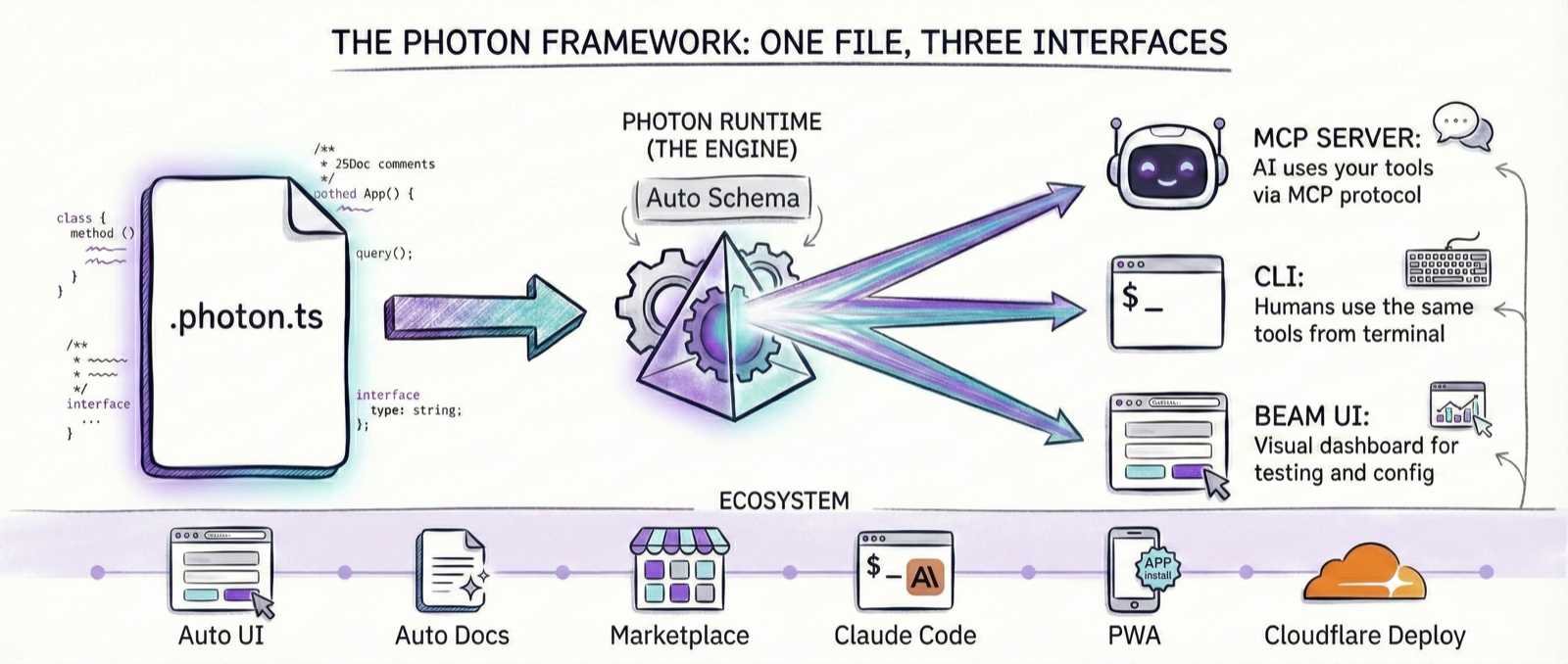
todo.photon.ts
  ├── CLI        photon cli todo add --task "..."
  ├── Web UI     photon  →  localhost:3008
  └── MCP        photon mcp todo  →  Claude, Cursor, etc.
The three surfaces share:
- Same validation — type constraints and
@paramrules enforced everywhere - Same logic — one method implementation, not three
- Same data —
@statefulstate is shared across all access paths - Same formatting —
@format tablerenders appropriately on each surface - Same intent — method names, comments, schemas, annotations, and formats become
_meta["photon/render"].intentso every surface can choose native controls without server-side UI code
When you add a @cached 5m tag, all three surfaces cache. When you add @throttled 10/min, all three enforce the rate limit. The annotations are surface-agnostic.
Intent is inferred, not declared through a new tag. List tasks plus @format table becomes a direct table view. Create task with a required title becomes a form/dialog. Delete task plus @destructive becomes a confirmed action. See Intent Metadata for the stable contract used by Beam, CLI, MCP clients, and desktop surfaces.
7. Where Photon Stores Your Data
Every photon has a home directory — the folder where its state, memory, logs, and compiled cache live. Photon picks this directory using one simple rule:
Where you run photon | Home directory |
|---|---|
Inside a marketplace (any folder containing .photon.ts files) | That folder |
| Anywhere else | ~/.photon (global default) |
A marketplace is just a directory with one or more .photon.ts files at any depth. No config file needed. The presence of source files is the signal.
~/Projects/myapp/          ← marketplace (contains .photon.ts files)
  tasks.photon.ts
  .data/
    tasks/                 ← state, memory, logs for tasks.photon.ts
      state/
      memory/

~/.photon/                 ← global default (used anywhere else)
  features.photon.ts
  .data/
    features/
All data for a photon — state, memory, logs, schedules, compile cache — lands under {home}/.data/{photon-name}/. The source layout mirrors the data layout exactly.
You can override the home directory for any process by setting PHOTON_DIR:
PHOTON_DIR=~/Projects/myapp photon beamThis lets you run Beam or the CLI against a specific marketplace from any working directory.
The daemon is the only global piece. Everything else — state, memory, schedules, cache — belongs to whichever marketplace or global home owns the photon file. The daemon serves all marketplaces from a single process.
Next Steps
| Ready to... | Go to |
|---|---|
| See all format types | Output Formats |
| Build something real | Getting Started |
| Declare user-configurable knobs | Settings |
| Coordinate related photons | Marketplace Configuration |
| Learn every tag | Tag Reference |
| Build custom HTML views | Custom UI |
| Read the full reference | Developer Guide |